Why Audio Gadget Upgrades are Essential for Content Creators
The digital media landscape is more competitive now than it has ever been. With millions of creators uploading videos, podcasts, and livestreams every single day, standing out requires more than just interesting subject matter. New creators often invest the vast majority of their production budgets into high-end cameras, advanced lighting kits, and sophisticated editing software. However, experienced media professionals understand a fundamental truth of human consumption: audiences will tolerate mediocre video quality, but they will instantly abandon content with poor audio.
Sound carries the emotional weight, clarity, and authority of your message. When a video suffers from echo, background hiss, or muffled dialogue, it creates immediate cognitive fatigue for the listener. This subconscious strain forces the audience to work harder to understand what is being said, ultimately leading them to click away. Upgrading your audio gadgets is not a luxury or an afterthought; it is a core operational necessity that directly impacts audience retention, brand authority, and overall channel growth.
The Psychology of Sound and Audience Retention
The primary goal of any content creator is to build an engaged, loyal audience. To achieve this, your production value must command respect. Poor audio quality sends a subconscious signal to the viewer that the creator is an amateur or simply does not care about the user experience. Conversely, pristine sound creates an immersive environment that fosters trust and authority.
The Problem with Built-In Hardware
Every consumer device used for content creation, from smartphones to top-tier mirrorless cameras, suffers from the exact same design limitation: terrible built-in microphones. These internal components are microscopic, cheaply manufactured, and poorly positioned. They are designed to capture general environmental sounds rather than clean, isolated human voices.
When you rely on built-in microphones, your audio suffers from several fatal flaws:
-
Ambient Noise Pollution: Internal microphones utilize omnidirectional pickup patterns, meaning they record everything from traffic outside your window to the internal hum of your computer fan.
-
Room Reflection and Echo: Without proper isolation, sound waves bounce off hard surfaces like bare walls and desks, creating a hollow, cavernous echo that destroys vocal clarity.
-
Distance Attenuation: The further you stand from a built-in microphone, the more your voice thins out, losing its natural bass and warmth.
Establishing Professional Authority
High-quality audio creates an immediate psychological connection known as acoustic intimacy. When your voice sounds rich, full, and clear, it simulates the experience of sitting in the same room as the listener. This level of clarity removes barriers to communication, making your arguments more persuasive, your stories more engaging, and your tutorials easier to follow.
Key Audio Hardware Categories for Critical Upgrades
To transition from amateur sound to studio-grade production, you need to understand the distinct roles that different audio gadgets play in your workflow. Upgrading involves creating a cohesive signal chain that captures, processes, and monitors sound accurately.
Advanced Microphone Technology
The microphone is the entry point of your audio signal chain. Choosing the right style of microphone depends heavily on your production environment and content format.
-
Dynamic Microphones: These units are highly recommended for creators working in unoptimized home studios or noisy apartments. Dynamic microphones are intentionally less sensitive to distant sounds, requiring the creator to speak closely into the capsule. This specific design feature naturally rejects room echo, keyboard clicks, and background traffic.
-
Condenser Microphones: Known for their incredible detail and sensitivity, condenser microphones capture a wider frequency range, adding a sparkling clarity to vocal performances. However, they are best suited for quiet, acoustically treated rooms, as they will easily pick up minor ambient distractions.
-
Wireless Lavalier Systems: For vloggers, fitness instructors, or interviewers who move around frequently, wireless clip-on lavalier setups are indispensable. They keep the microphone capsule a consistent distance from the speaker’s mouth, ensuring uniform volume levels regardless of physical movement.
Dedicated Audio Interfaces and Preamps
If you choose a professional XLR microphone over a basic plug-and-play USB model, you will require an external audio interface. An interface acts as a translator between the analog signal produced by the microphone and the digital operating system of your computer.
Upgrading to a dedicated interface gives you access to premium preamps. Preamps boost the incredibly weak electrical signal from a microphone up to a usable level without introducing unwanted electrical hiss or self-noise. A high-quality interface also provides precise physical gain control, allowing you to fine-tune your input levels on the fly to prevent digital clipping.
Professional Studio Monitoring
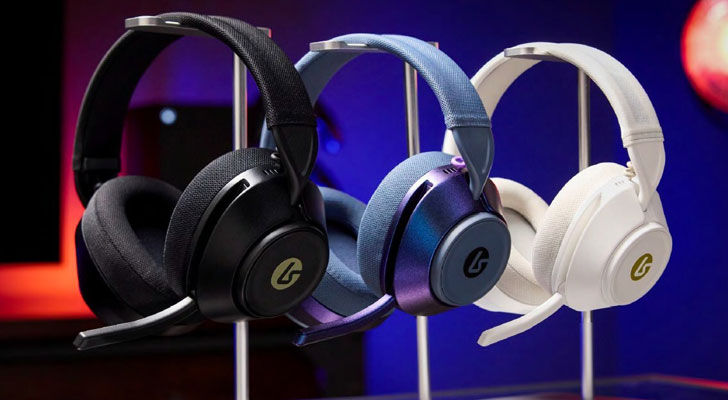
You cannot fix an audio problem in post-production if your listening equipment is incapable of reproducing that problem accurately. Standard consumer earbuds and fashion-forward headphones are chemically engineered to flatter music by artificially boosting the bass and treble frequencies.
Content creators need studio monitors or over-ear studio monitoring headphones that offer a flat, neutral frequency response. A neutral response ensures that what you hear while editing is exactly what your audience will hear on their phones, laptops, and car stereos. This accuracy allows you to confidently balances vocal levels against background music and accurately remove low-end muddiness.
Post-Production Efficiency and Time Management
Investing in superior audio gadgets does more than just elevate the final product; it fundamentally alters your editing workflow, saving you hours of frustrating labor every week.
Reducing the Reliance on Software Fixes
Many creators fall into the trap of believing that budget audio can be completely rescued during the editing phase using digital filters. While modern noise-reduction software is powerful, it is not magic. Aggressive noise cancellation often strips away the natural frequencies of the human voice, leaving it sounding metallic, robotic, and processed.
By capturing pristine audio at the hardware source, you eliminate the need for complex, destructive multi-step repair workflows. Your editing process shifts from tedious damage control to creative enhancement.
Streamlining the Editing Process
When your raw audio tracks are naturally clean, well-balanced, and free of background noise, your time inside your digital audio workstation is dramatically reduced. Instead of spending hours masking background hums or manually ducking audio spikes, you can focus your creative energy on pacing, visual storytelling, and color grading. Clean audio streamlines your rendering pipeline, allowing you to publish more content on a consistent schedule.
Core Audio Equipment Breakdown
| Gadget Category | Core Function | Best Content Format | Target Resolution/Spec |
| Dynamic XLR Microphone | Rejects ambient room noise; delivers rich broadcast-ready vocals | Podcasts, streaming, voiceovers | Cardioid polar pattern; high output gain |
| Audio Interface | Converts analog microphone signals into pristine digital files | Studio recording, talking-head videos | 24-bit depth / 192 kHz sample rate |
| Wireless Lavalier | Provides complete hands-free physical mobility | Vlogging, lifestyle videos, live interviews | 2.4 GHz digital transmission; dual-channel |
| Studio Headphones | Provides uncolored, completely flat audio playback | Video editing, audio mixing, mastering | Open-back or closed-back; flat frequency |
| Acoustic Treatment | Absorbs high and mid-frequency sound wave reflections | Any permanent home studio space | High-density acoustic foam or fiberglass |
Frequently Asked Questions
What is the practical difference between a USB microphone and an XLR microphone setup?
USB microphones feature built-in audio interfaces and preamps, allowing them to plug directly into a computer port for immediate operation. They are highly portable and cost-effective for beginners. XLR microphones require an external audio interface and an analog cable to function. While more expensive, an XLR setup offers significantly higher audio fidelity, modular upgradability, and physical knob controls for precise input adjustments.
How do I stop my microphone from recording the loud clicking sounds of my computer keyboard?
To minimize keyboard noise, switch to a dynamic microphone with a cardioid pickup pattern, which rejects sound coming from behind the capsule. Position the microphone as close to your mouth as safely possible, and place your keyboard directly behind the microphone body. Additionally, mounting your microphone on a suspended boom arm with a shock mount isolates it from desk vibrations caused by typing.
Why is an open-back headphone preferred over a closed-back headphone for audio editing?
Open-back headphones have earcups that allow air and sound to pass freely through the rear shell. This specific design prevents sound pressure and low-end bass frequencies from building up inside the cup, resulting in a much wider, more natural soundstage. Closed-back headphones are superior for blocking outside noise during recording, but open-back models provide the flat, uncolored accuracy required for long editing sessions.
Will buying an expensive microphone completely fix the echo in a room with bare walls?
No, an expensive microphone cannot overcome poor room acoustics. In fact, a highly sensitive high-end microphone will often highlight room reflections even more clearly. If your recording space has bare walls, hardwood floors, and large windows, sound waves will continuously bounce around. You must combine a proper microphone upgrade with basic acoustic treatment, such as high-density foam panels or heavy moving blankets, to absorb those reflections.
What is digital audio clipping and why is it considered destructive?
Digital clipping occurs when an incoming audio signal is too loud for the hardware to process, causing the waveform to exceed the maximum allowable threshold of zero decibels. When this happens, the tops and bottoms of the audio waves are completely squared off and flattened. This results in harsh, distorted digital noise that cannot be repaired or recovered by any software program in post-production.
Can wireless lavalier microphones experience signal interference during outdoor shoots?
Yes, wireless systems can experience interference, particularly in crowded urban environments filled with competing wireless signals, Wi-Fi networks, and Bluetooth devices. To mitigate this risk, modern creators upgrade to wireless systems that utilize intelligent frequency-hopping technology within the 2.4 GHz spectrum or secure UHF bands, which automatically switch to the cleanest available channel to prevent dropouts.